On this page
1. The problem
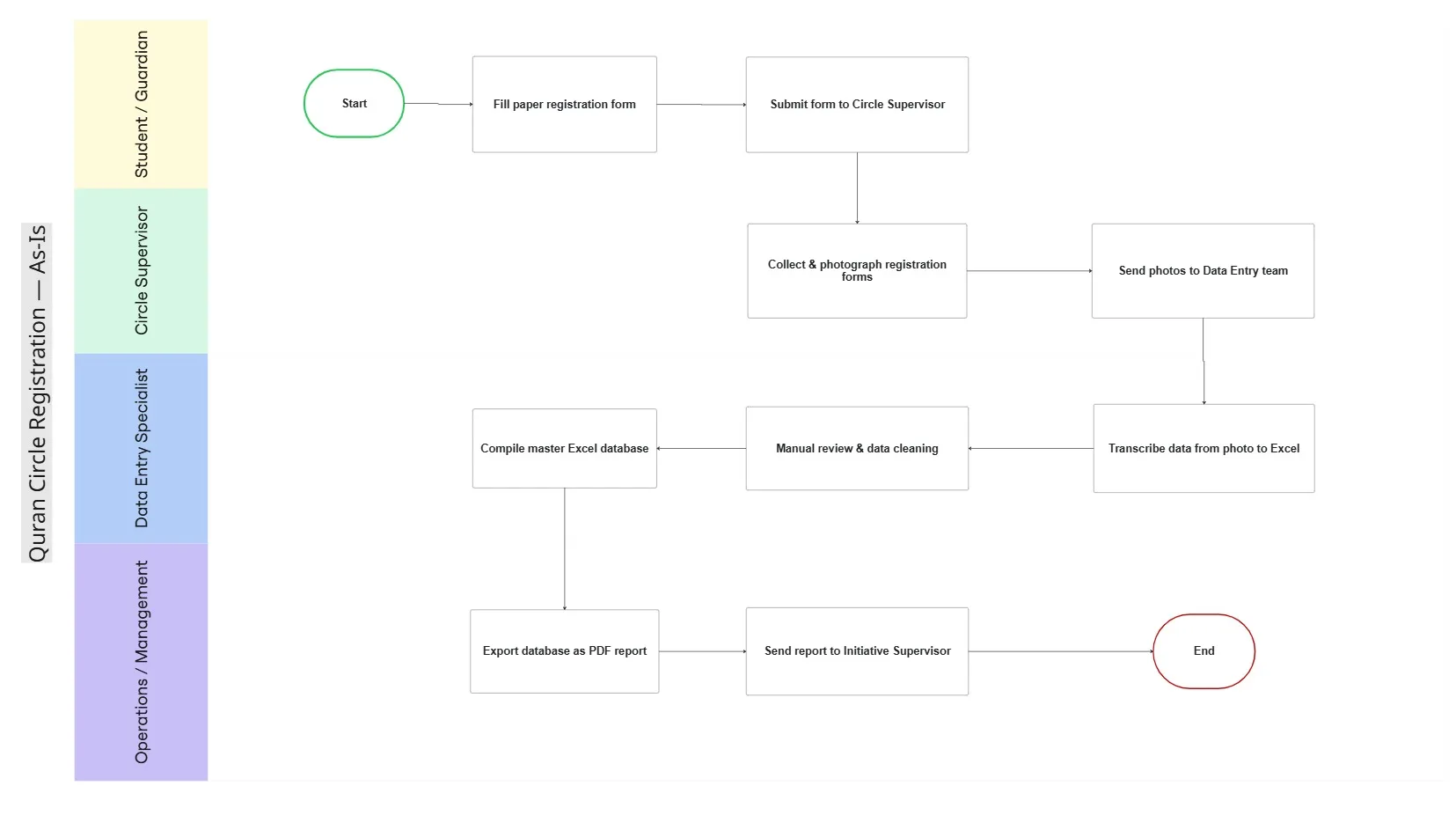
Every registration started on paper. Guardians filled in a form, circle supervisors collected and photographed it, and a data entry specialist re-typed every field into Excel before operations could compile a report.
The As-Is map surfaced five bottlenecks:
- Manual transcription — about 5 minutes of re-typing per student.
- Handwriting errors — misread photos produced inaccurate records.
- No duplicate check — the same student could be enrolled in two circles.
- No visibility — supervisors could not see their own registrations; data reached them 24–48 hours later.
- No structured reporting — leadership had no reliable numbers to plan capacity or expansion.
2. Approach
As-Is mapping. A four-lane BPMN (Guardian · Circle Supervisor · Data Entry Specialist · Operations) traced the form from paper to PDF report and showed where time and accuracy were lost.
Stakeholder analysis. Seven stakeholder groups mapped on a Power/Interest matrix, each with its concerns and an engagement strategy. Two of them (leadership as sponsor, IT as solution owner) were not part of the original process but had to be brought in for any digital solution to land.
Requirements. Elicited with circle supervisors and the operations team, then prioritised with MoSCoW:
- Must have — registration without account creation, all 13 fields, mandatory-field validation, National ID duplicate detection, filtered CSV export, live supervisor dashboard.
- Should have — on-screen confirmation, leadership analytics with PDF export.
- Could have — assigning students to circles inside the app.
- Non-functional — Arabic RTL, Android 8+/iOS 13+, restricted access to personal data, UTF-8 exports that open cleanly in Excel, 99% uptime during enrollment season.
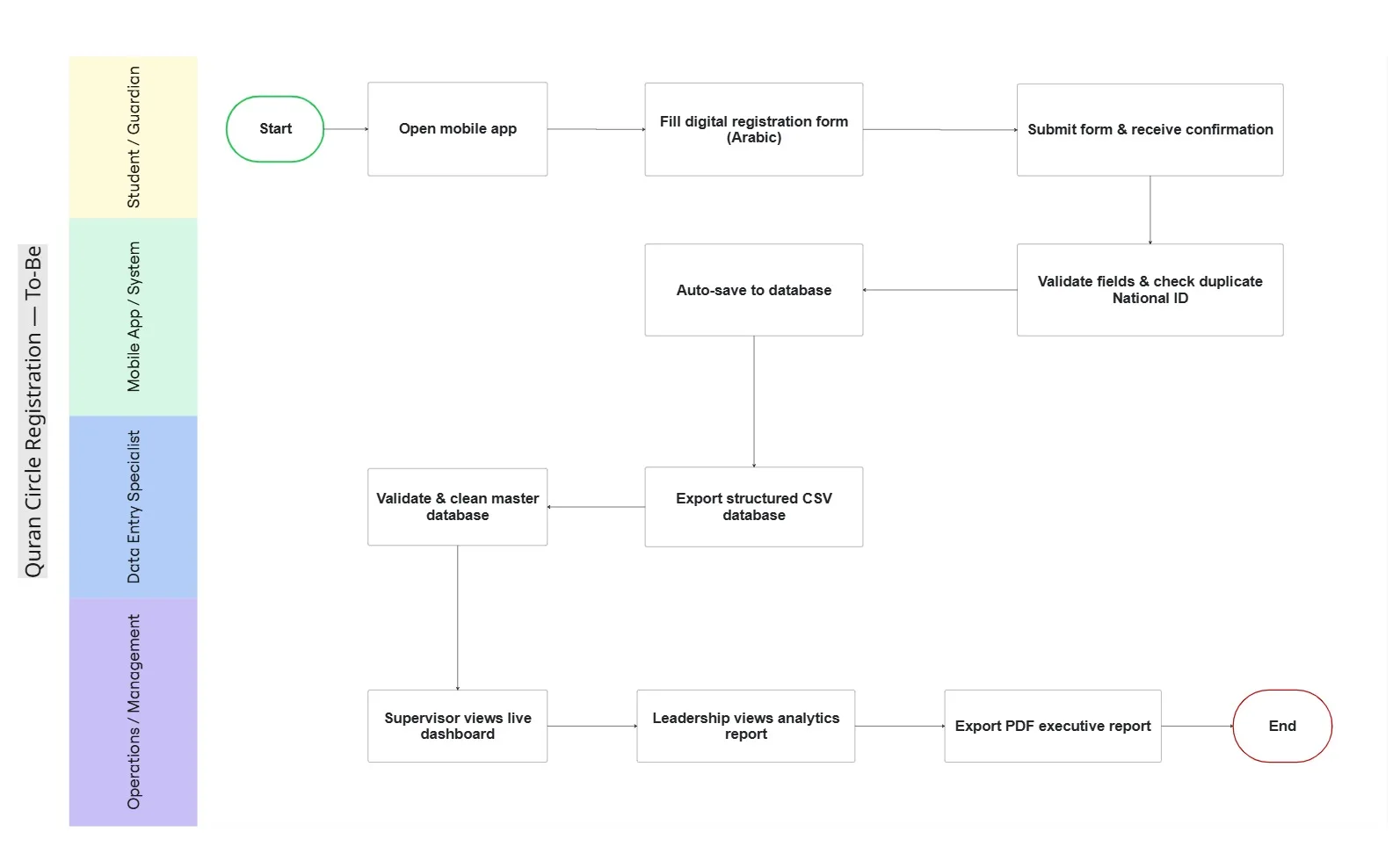
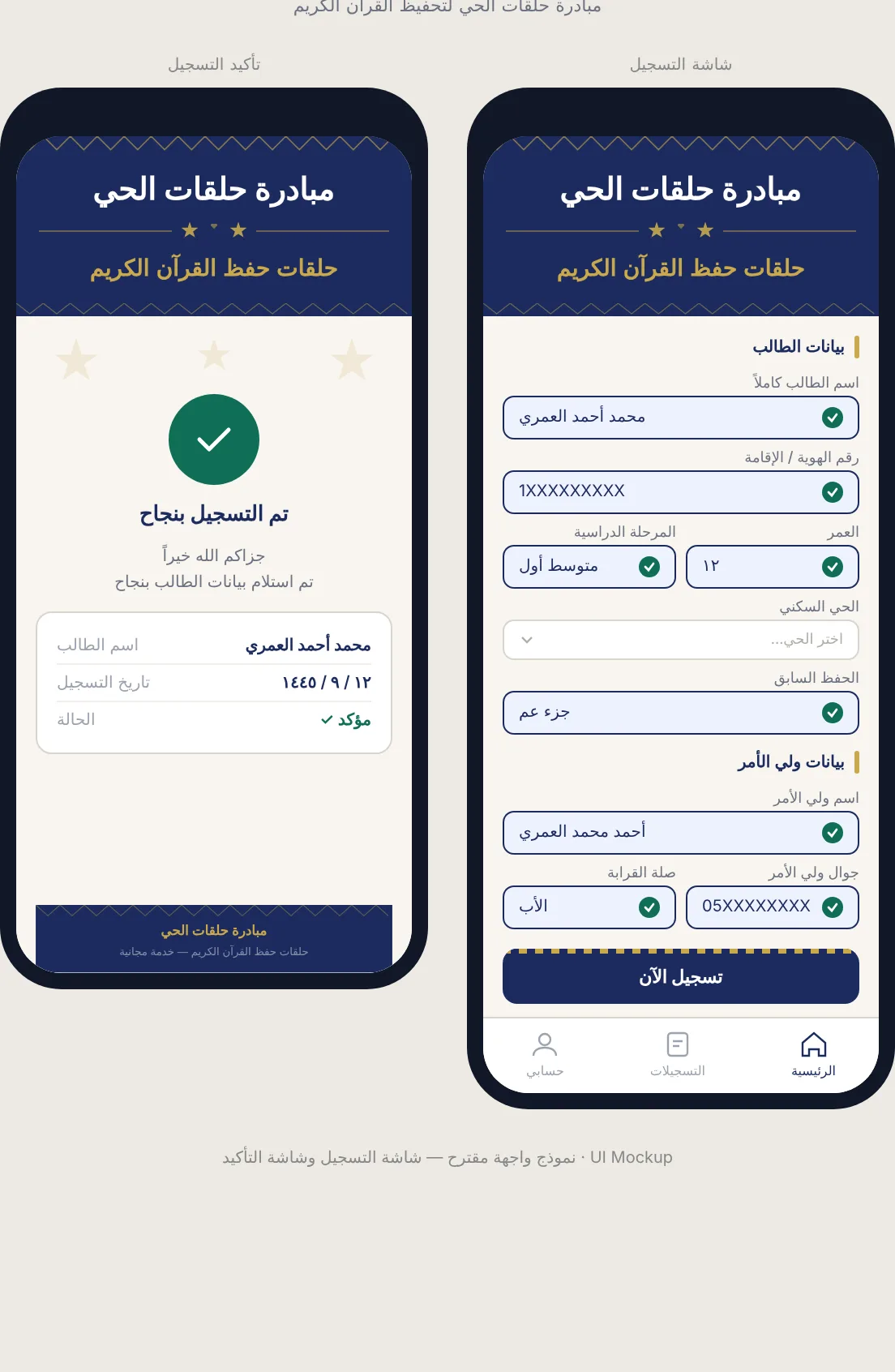
To-Be design. The paper form becomes a mobile submission; the system validates fields, checks the National ID, auto-saves to one database and confirms to the guardian. The data entry role shifts from re-typing to validating and cleaning, and supervisors and leadership read live dashboards instead of waiting for a report.
3. Key design decisions
- No account creation for guardians — the fastest path to adoption among non-technical users.
- National ID as the unique key — the only reliable way to stop duplicate enrollments across circles.
- Keep the CSV/Excel workflow — the operations team keeps the tool it knows, minus the transcription.
- Role-based access — supervisors see their circle, leadership sees the consolidated view, personal data stays restricted.
- Phased delivery — each phase is independently deployable, so value arrives even if later phases slip.
4. Recommendations & roadmap
| Phase | Weeks | Delivers |
|---|---|---|
| 1 · Core | 1–6 | Mobile registration, field validation, National ID duplicate detection, CSV export |
| 2 · Operations | 7–10 | Live supervisor dashboard, circle capacity, guardian confirmation |
| 3 · Intelligence | 11–16 | Leadership analytics, PDF reports, multi-community scaling, circle assignment |
Risks planned for: low smartphone adoption (assisted registration through supervisors), weak connectivity (offline mode with sync), supervisor resistance (short onboarding, old-vs-new comparison), privacy (pre-launch review, National ID restricted by role).
5. Success criteria (defined in the BRD)
| Criterion | Target |
|---|---|
| Manual paper transcription | Eliminated within one enrollment cycle after go-live |
| Data entry time per student | From ~5 minutes to under 30 seconds |
| Duplicate records | Zero in the master database |
| Supervisor access to data | Real time, without requesting reports |
| Leadership reporting | Self-service from the dashboard |
6. Outcome & reflection
The BRD was approved by operations and the executive sponsor, and the package was handed over ready for development; build and implementation sat outside the BA scope.
What I would do differently:
- Measure a baseline first. The 5-minute figure is an estimate; timing a sample of forms would have made the business case stronger.
- Test the form with guardians before finalising the mockup, since they are the least technical and most numerous users.
- Check acceptance criteria against the mockup. The first mockup draft omitted the National ID field the whole duplicate-check depends on; it has since been added.
Artifacts
- As-Is & To-Be BPMN diagrams
- BRD v1.0 · Recommendations & roadmap
- Stakeholder register · User stories · Use cases (workbook)
- Arabic mobile UI mockup (registration + confirmation)
Client name and identifiers have been removed from all artifacts.
- BPMN
- Requirements Elicitation
- Stakeholder Analysis
- MoSCoW
- User Stories
- Use Cases
- BRD
- UI Mockup
- Process Redesign
Open the work
The actual artifacts, not screenshots of them.