On this page
1. The problem
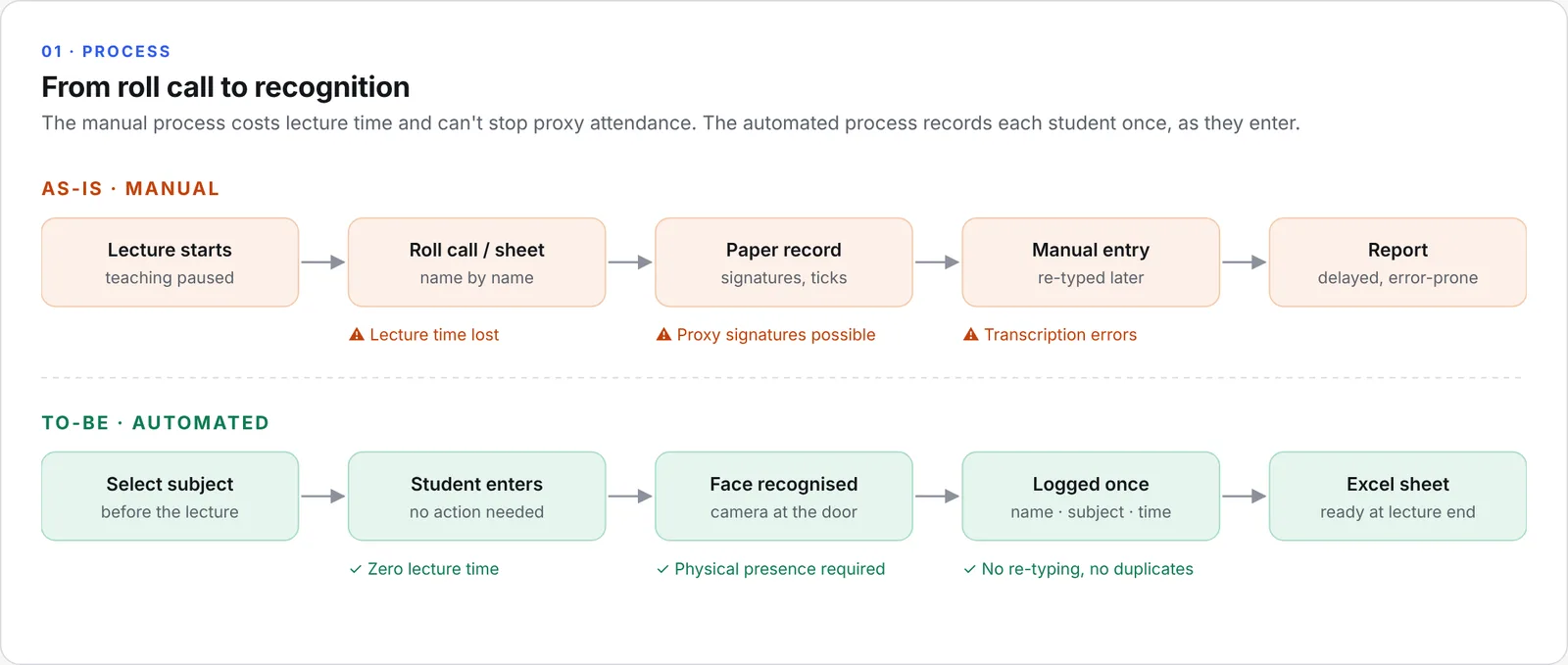
Taking attendance by hand fails in three ways at once:
- It costs teaching time. A roll call or a passed-around sheet takes minutes out of every lecture, every week.
- It can be gamed. A signature on a sheet does not prove the student was in the room.
- It produces data late. Paper records are re-typed afterwards, so errors creep in and reports arrive days later.
Problem statement: How can a lecture hall record who is actually present — accurately, without interrupting the lecture, and without students doing anything?
2. Requirements
Functional
- Enrol a student once (ID, name, face photos); no re-enrolment per course.
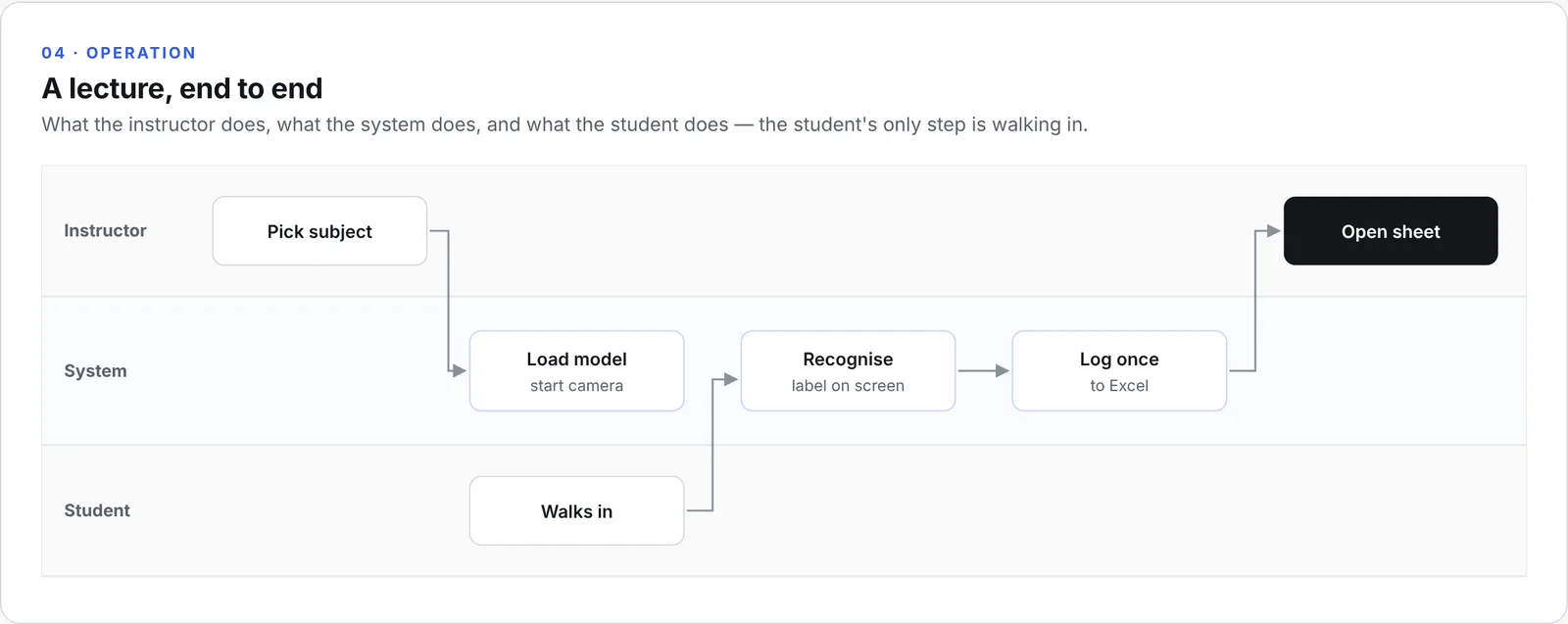
- The instructor selects the subject before the lecture; every record carries that subject.
- Detect and recognise faces from a live camera stream at the entrance.
- Log each recognised student once per subject per day, with a timestamp.
- Show unrecognised faces as "Unknown" on screen without logging them.
- Write attendance to an Excel sheet the instructor can open, filter, and share.
Non-functional
- Runs on a low-cost edge device, with no cloud dependency.
- Camera-agnostic: works with a dedicated camera module or the hall's existing CCTV stream.
- No face images stored or transmitted beyond the enrolment set; only attendance records are written.
- Usable by a non-technical instructor: one choice (the subject), then hands-off.
3. Solution
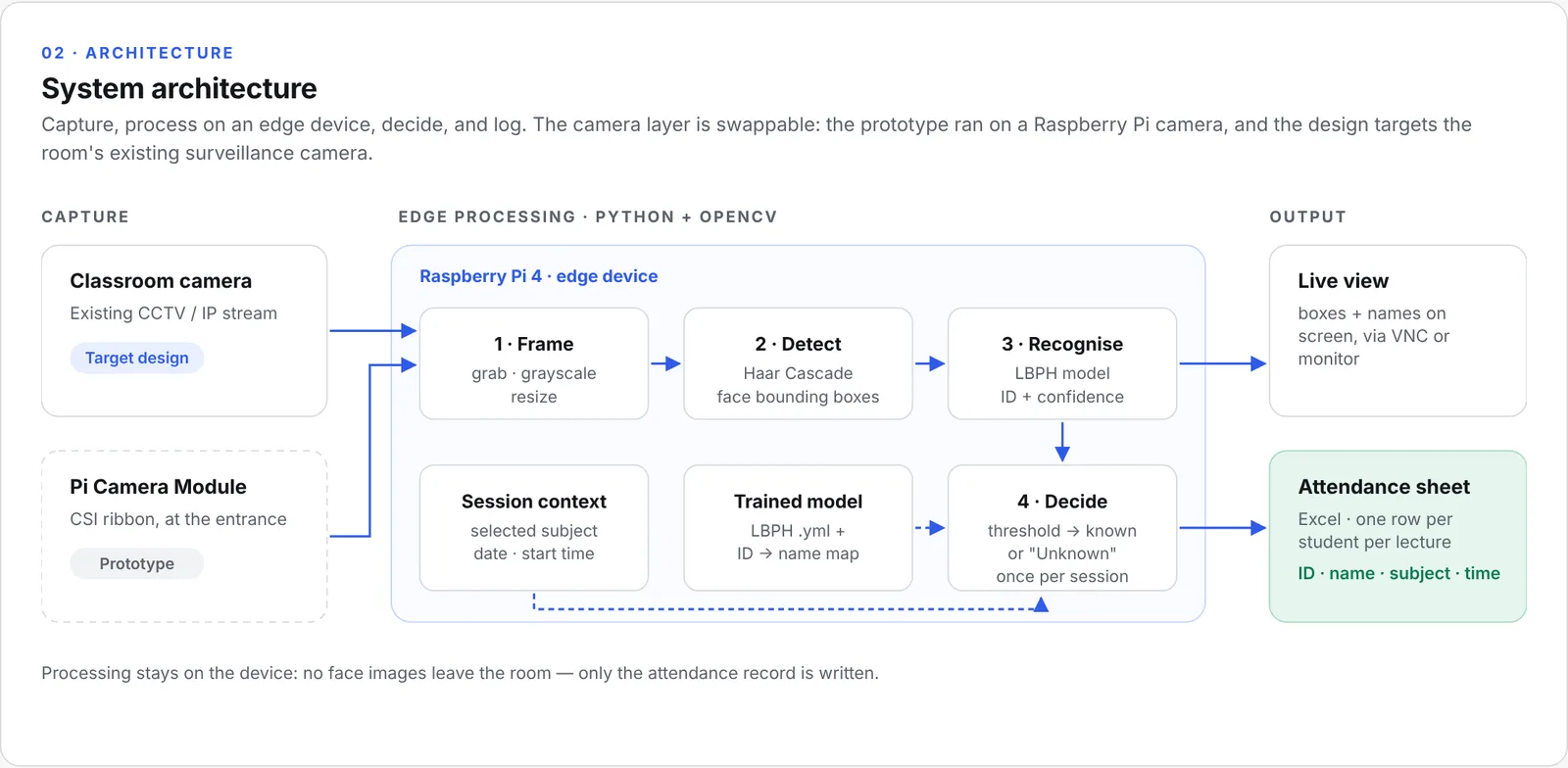
The system has three layers:
- Capture: a camera at the entrance. The prototype used a Raspberry Pi Camera Module over CSI; the target design reads the hall's existing surveillance camera, so no new hardware goes on the wall.
- Edge processing: a Raspberry Pi 4 running Python and OpenCV. Each frame is converted to grayscale, faces are found with a Haar Cascade, and each face is identified with an LBPH recogniser trained during enrolment.
- Output: a live view with boxes and names (the instructor sees who has been recognised), and an Excel attendance sheet.
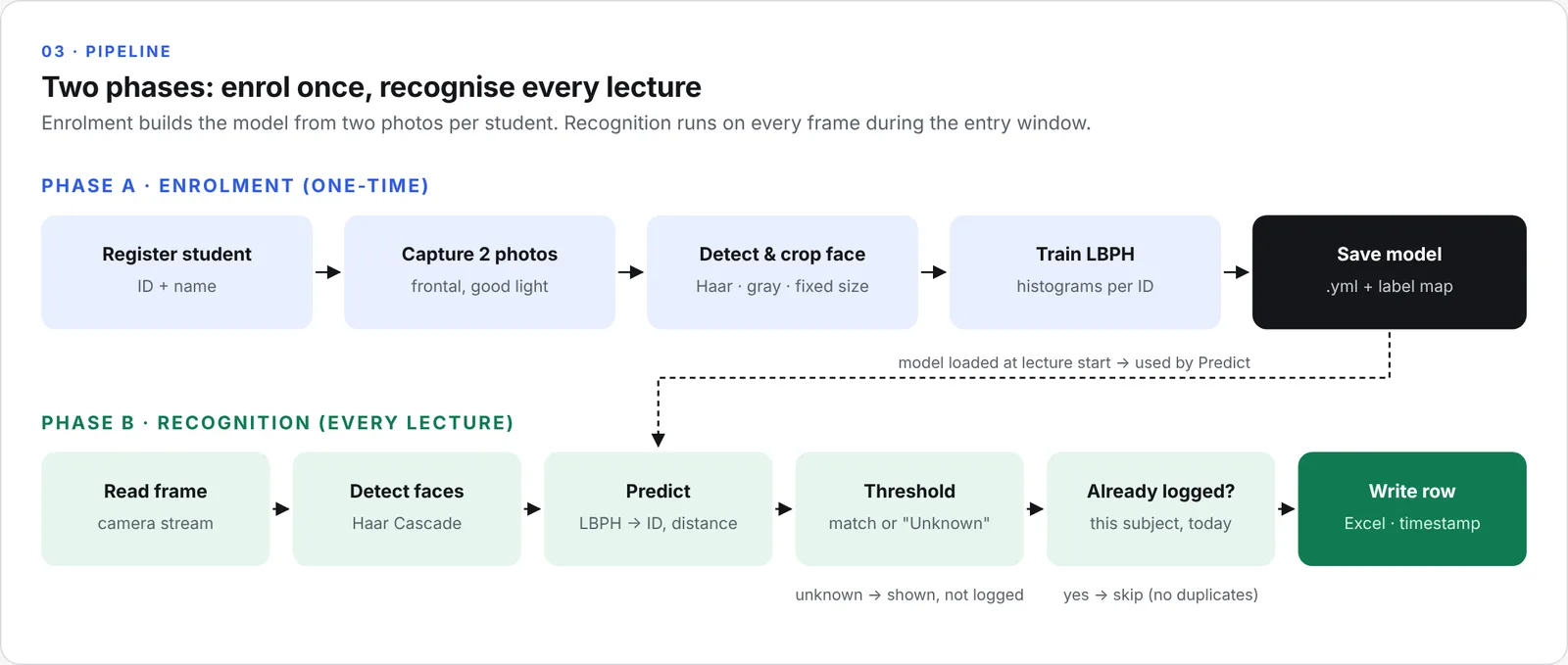
Enrolment (one-time). Each student is registered with an ID and name, and two frontal photos are captured. Faces are detected, cropped, converted to grayscale, and resized to a fixed size, then used to train the LBPH model. The model and the ID-to-name map are saved to disk.
Recognition (every lecture). The model loads when the lecture starts. For every face in a frame, LBPH returns a predicted ID and a distance. Matches below the confidence threshold become a known student; the rest are shown as "Unknown". Before writing, the system checks whether that student is already logged for this subject today, so a student who stays in front of the camera is recorded once.
4. Prototype
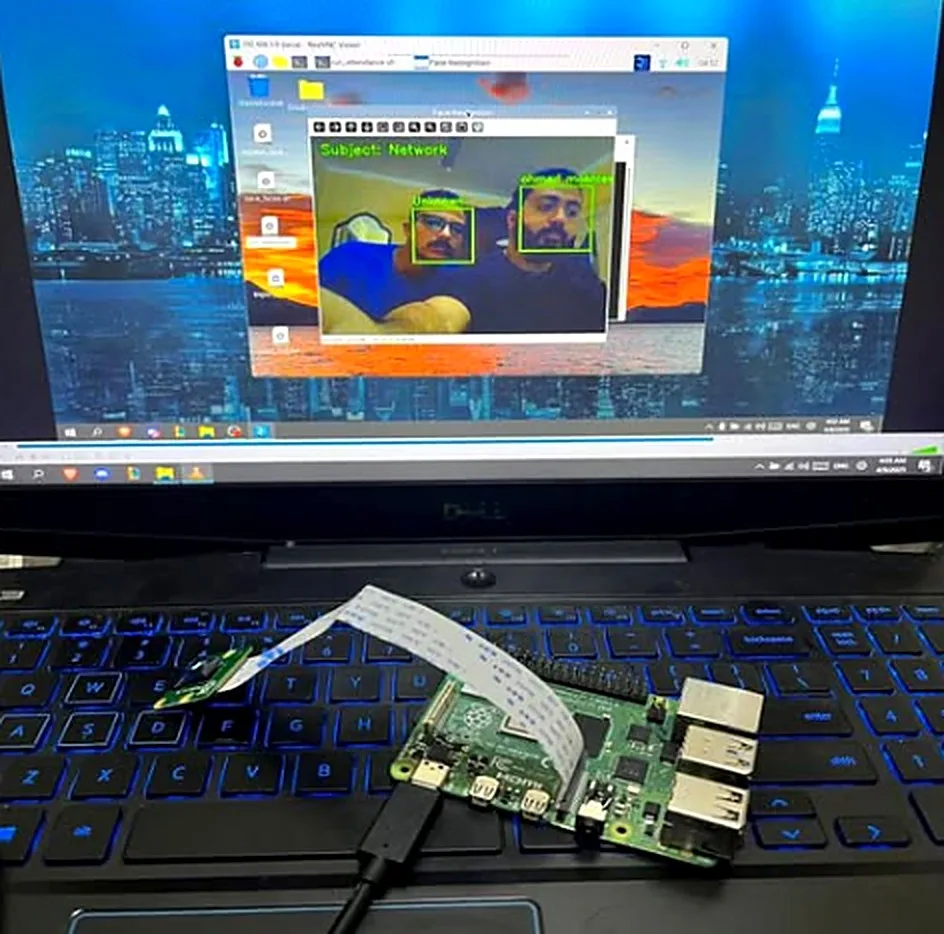
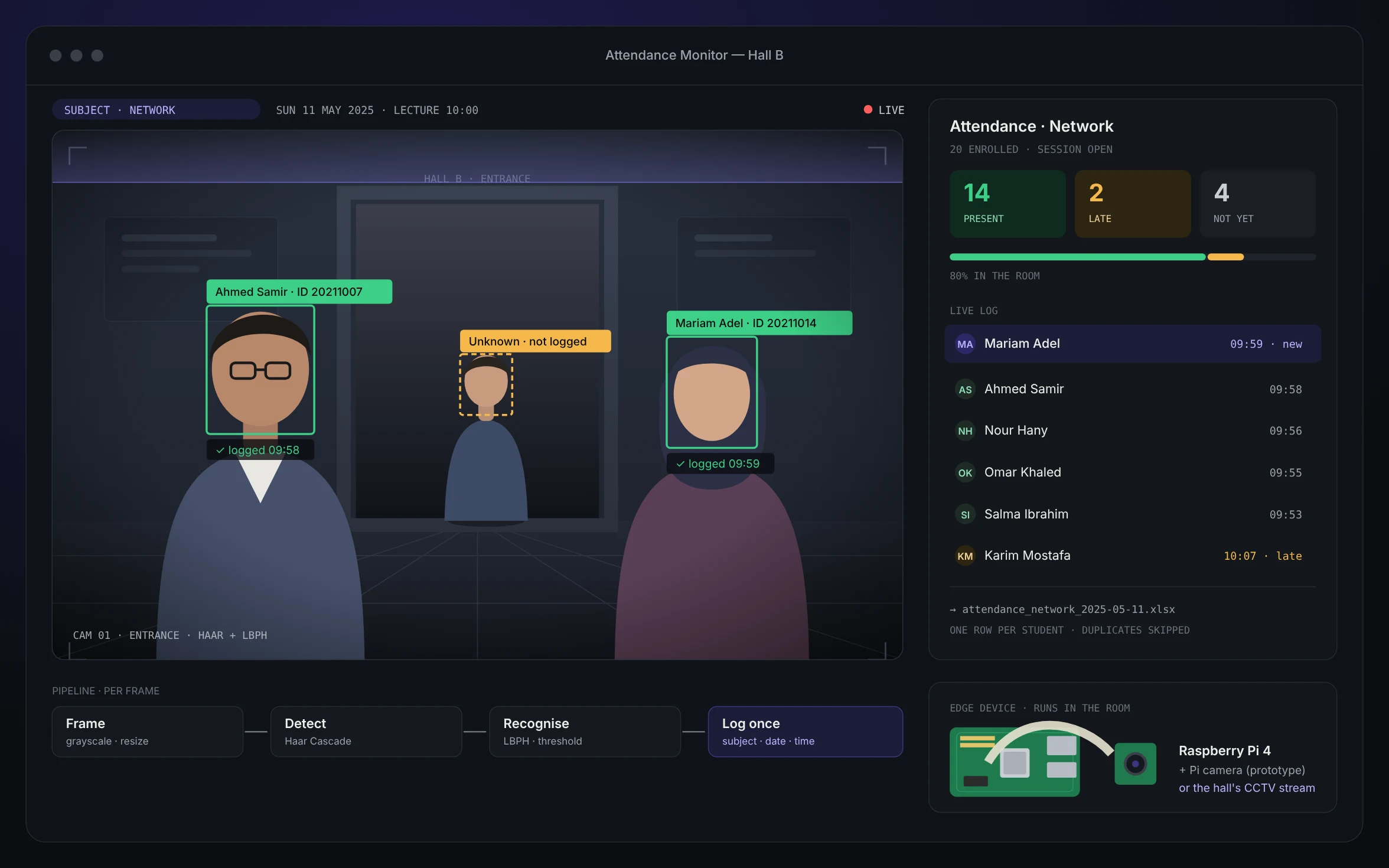
The working prototype: a Raspberry Pi 4 with a Pi Camera Module, viewed over VNC on a laptop. The "Face Recognition" window shows the selected subject (Network) and two enrolled faces recognised and labelled in real time.
Sample output: attendance-sample.xlsx — one sheet per subject and lecture, with student ID, name, subject, date, and time in. A summary counts present, late, and absent, and computes the attendance rate. (Recreated for the portfolio with fictional names.)
5. Key design decisions
- Haar Cascade + LBPH, not deep learning. Both run in real time on a Raspberry Pi CPU with no GPU, and LBPH trains in seconds. A CNN-based recogniser would be more robust, but too heavy for the target hardware at this stage.
- Two photos per student. Enrolment had to be quick enough to run for a whole class. LBPH can be retrained or extended per student without rebuilding everything.
- Edge processing. Faces are processed on the device in the room. Only attendance rows leave it, which keeps the privacy footprint small and removes any network dependency.
- Subject chosen before the lecture. One explicit choice by the instructor is simpler and more reliable than inferring the course from a timetable, and every record is tagged correctly.
- Log once per subject per day. De-duplication at write time keeps the sheet clean without any manual cleanup.
- Excel as the output. It is what instructors and administrators already use; no new system to learn.
6. Testing
The system was tested with around 20 enrolled students. Recognition was reliable for frontal faces in normal classroom lighting, and each student was logged once per session.
7. Challenges & limitations
- Lighting and angle sensitivity. LBPH works best on frontal, evenly lit faces. Side profiles, backlight, and heads turned down reduce recognition. Placing the camera at the door, facing the entrance at head height, mattered more than any code change.
- Small enrolment set. Two photos per student keep enrolment fast but limit robustness to glasses, beards, or changes in appearance over a semester.
- Several faces at once. When students enter in a group, faces overlap or are too small in the frame; a short entry window and a well-placed camera reduce misses.
- Spoofing. A printed photo can trigger a Haar + LBPH pipeline. Liveness detection was out of scope.
- No formal accuracy metric. Testing confirmed the system worked; it did not produce a measured accuracy figure.
8. What I would do next
- Measure before claiming. Build a labelled test set (lighting, angles, groups) and report precision, recall, and the false-match rate at the chosen threshold.
- Upgrade the recogniser. Move to embedding-based recognition (e.g., a lightweight face-embedding model) for better robustness with few photos per student.
- Add liveness detection to stop photo spoofing.
- Connect to the student information system instead of a standalone Excel file, with a simple dashboard for attendance trends per course.
- Privacy by design. Written consent at enrolment, a defined retention period for face data, and an opt-out path with a manual fallback.
Diagrams and the sample sheet were recreated for this portfolio from the project's design. The prototype photo is original.
- Computer Vision
- OpenCV
- Haar Cascade
- LBPH
- Python
- Raspberry Pi
- Edge Computing
- Requirements
- Process Redesign
- Privacy by Design
Open the work
The actual artifacts, not screenshots of them.